Raytac Group, a worldwide leader in wireless modules, wireless solutions, and a Nordic-recommended third-party module manufacturer, announces the upcoming release of the AN54LM series modules, built on Nordic’s nRF54LM20A/nRF54LM20B SoC.
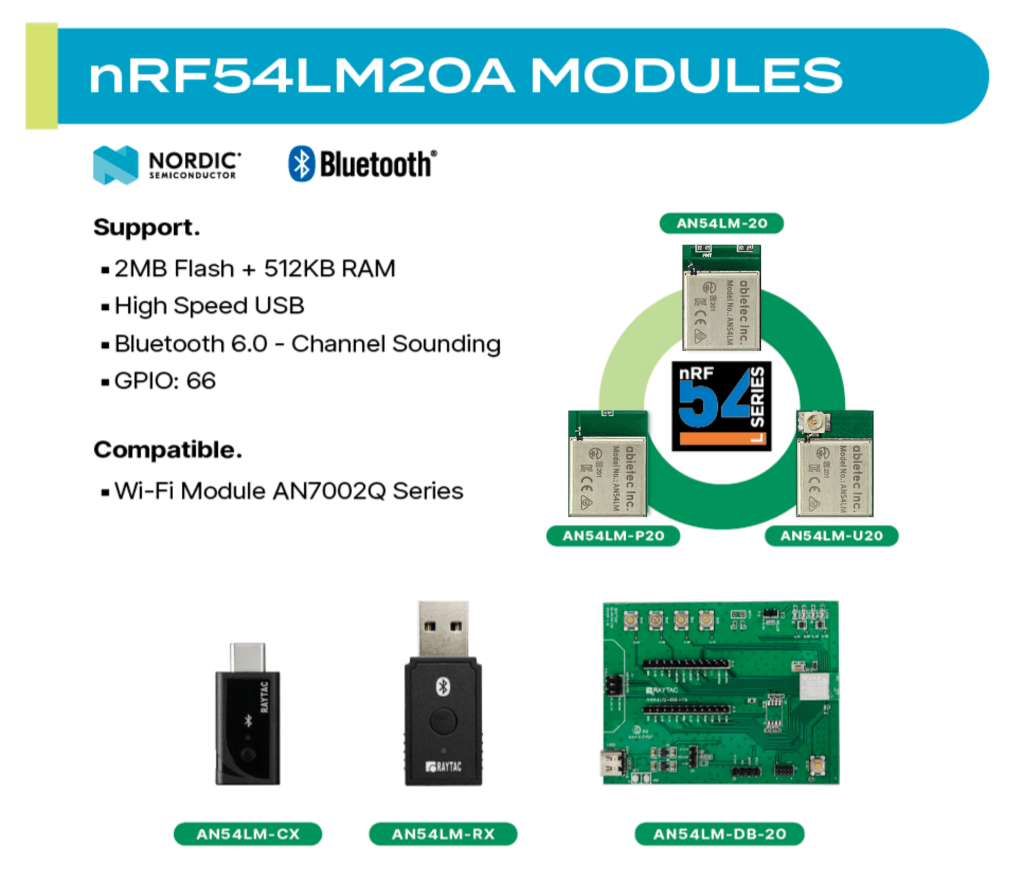
The series comes in a compact form factor of 9.9 x 13.3 x 2.0 mm (0.39 × 0.52 × 0.08 inches) and offers 3 antenna variants:
The Max output power is +8 dBm and data rates up to 4 Mbps for low-latency applications.
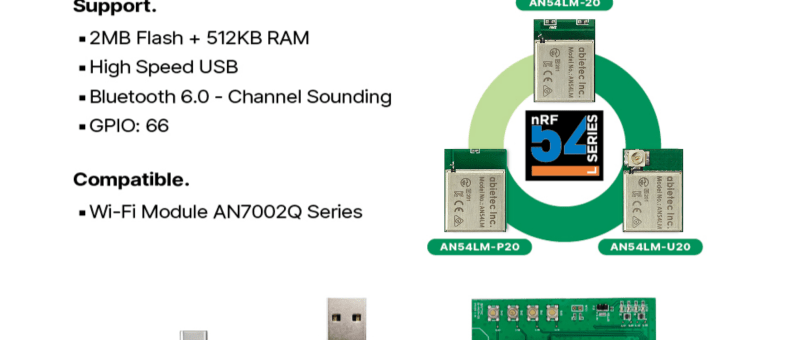
Powered by the nRF54LM20A/B, AN54LM features a high-end dual-core architecture (Arm Cortex-M33 + RISC-V) with up to 2 MB Flash and 512 KB RAM, enabling complex, memory-intensive applications.
In addition to its multi-protocol support, AN54LM series is compatible with the AN7002Q series Wi-Fi modules(nRF7002 solution) to enable Wi-Fi expansions. Know more about the AN7002Q series here.
On the security side, AN54LM series’ hardware and firmware align with EU Cyber Resilience Act (CRA) security principles, helping ensure trusted device operation and lifecycle security.
Alongside modules, Raytac is also working on developing a complete ecosystem, including evaluation boards(Dev Kits) and USB dongles, providing a practical pathway to faster time-to-market for embedded engineers.
“The AN54LM series represents Raytac’s/abietec’s continued commitment to delivering high-quality wireless modules based on Nordic’s solutions." “By combining advanced processing capabilities, multi-protocol support, and a comprehensive development ecosystem, we aim to help all engineers innovate and reduce time-to-market.” — Lyon Liu, CEO, Raytac Group.
Raytac Group, together with Raytac Corporation (USA) and abietec Inc., will exhibit at Embedded World 2026, taking place March 10–12, 2026, at the Nürnberg Convention Center, Germany.
Visit us at Hall 3, Booth 3-426 to discover how Raytac is driving the future of wireless connectivity — from ultra-low-power Bluetooth® modules to advanced Wi-Fi and system-level solutions.
At the show, Raytac will showcase:
Announcement on our AN54LM series: NordicSemi nRF54LM20A modules and dongles that powers up the IoT market with lower power consumption and High speed USB. (Product link click me)
New Nordic nRF54L15 & 10 & 05 series modules: AN54LQ and AN54LV, built for Bluetooth 6.0 with ultra-low power, strong RF performance, coming up with 4 form factors and 7 antenna types
New Wi-Fi + BLE dongle based on the Nordic nRF7002 and nRF5340 solutions
live demos from our partners’ applications
Channel Sounding demo showcasing enhanced ranging accuracy and RF performance
How Raytac’s ecosystem and design partners help you accelerate product development.
abietec Inc. will showcase:
Bluetooth + Wi-Fi combo modules powered by Infineon CYW55912 chipset
Comprehensive OEM/ODM design services supporting a wide range of wireless applications.
Stop by our booth to see live demos, discuss your next project with our engineers, and learn how Raytac and abietec can help bring your wireless ideas to life.
We’re waiting for you at: Embedded World 2026 📍 Nürnberg Convention Center, Germany 📅 March 10–12, 2026 📌 Hall 3, Booth 3-426
Let Raytac and abietec power your next innovation: from concept to connected reality!
Edited by Business Development Manager: Tony Yin
Raytac Corporation 勁達國際電子股份有限公司 / Raytac Corporation (USA) / abietec Inc. A Bluetooth, Wi-Fi, and LoRa Module Maker/ODM & OEM Manufacturer based on Nordic nRF54; nRF53: nRF52; nRF51; nRF7002 Infineon: CYW55912 NXP: RW61 Series Semtech Specification: SX1262
[New Taipei City, Taiwan – January 12, 2026] Raytac Corporation, a global leading supplier of Bluetooth, Wi-Fi, and wireless modules, announces a strategic partnership with Acal BFi(Website link) to strengthen wireless connectivity support for customers across Europe. Through this collaboration, Raytac’s portfolio of pre-certified Bluetooth® Low Energy, Wi-Fi, and Wi-Fi + Bluetooth modules will be supported by Acal BFi’s local application engineering and design-in expertise.
Raytac specializes in short-range RF connectivity, delivering production-ready wireless modules optimized for low power consumption, RF robustness, and fast system integration. Additionally, Raytac focuses on simplifying wireless design while ensuring stable performance across demanding industrial, medical, and IoT environments.
Raytac’s module portfolio includes ultra-low-power Bluetooth LE modules, Wi-Fi modules, and versatile Wi-Fi + Bluetooth combo solutions designed for reliable radio coexistence and long-term availability. All Raytac modules are pre-certified to major global regulatory standards, including CE, FCC, IC, UKCA, TELEC, KC, RCM, SRRC, NCC, and WPC, enabling customers to significantly reduce certification time and compliance risk.
“Great ideas deserve great hardware,” said Lyon Liu, CEO, Raytac. “Our mission is to remove complexity from wireless design. Together with Acal BFi, we can now support customers not only with modules, but with the integration expertise to make sure those modules perform in the real world – in metal housings, in noisy RF environments, in medical devices, in smart sensors, wherever reliability matters.”
“Bluetooth and Wi-Fi connectivity is now a core requirement in almost every market we serve – from smart infrastructure and industrial automation to healthcare and sensing,” said Matthias Beuther, Business Development Manager, Acal BFi. “By partnering with Raytac, we are adding a powerful and proven wireless platform to our portfolio. The combination of Raytac’s module technology and our application engineering expertise gives our customers a faster, lower-risk path to market.”
By working closely with Acal BFi’s IoT & Wireless Technology Centre, customers gain access to local technical support covering antenna selection and tuning, power optimization, enclosure considerations, and coexistence validation. This partnership enables a more predictable, minimal-risk path from prototype to volume production for high-reliability wireless products deployed in real-world environments.
For inquires, please contact the below Acal BFi regional offices:
Edited by Business Development Manager: Tony Yin
Raytac Corporation 勁達國際電子股份有限公司 / Raytac Corporation (USA) / abietec Inc. A Bluetooth, Wi-Fi, and LoRa Module Maker/ODM & OEM Manufacturer based on Nordic nRF54; nRF53: nRF52; nRF51; nRF7002 Semtech Specification: SX1262
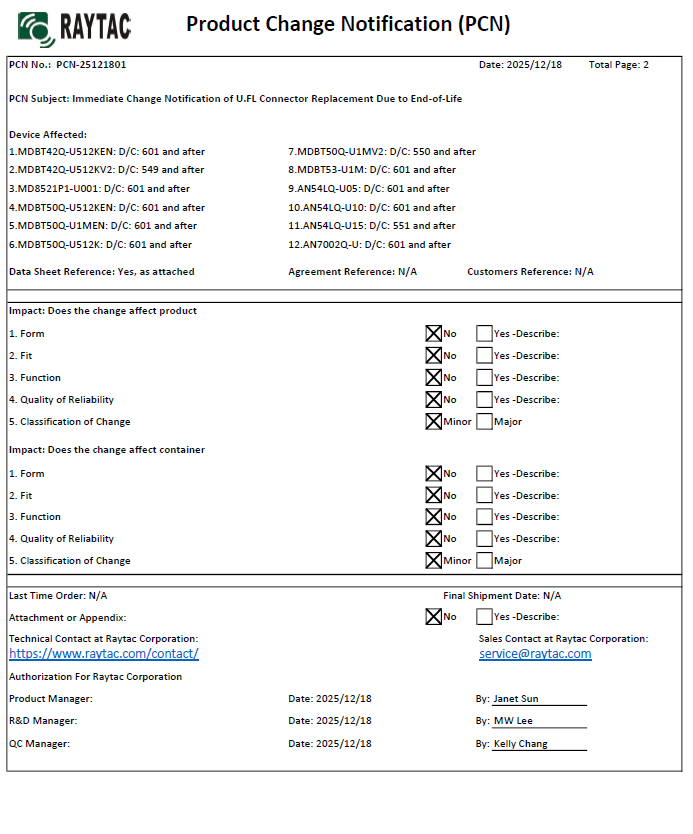
There are no changes on Form, Fit, Function, and Quality of Reliability. Only change in u.FL Connector Appearance. All existing certifications and technical documentations remain valid.
We kindly invite our customers, distributors, and partners to update your records accordingly. For any questions or support regarding this update, feel free to reach out via: sales@raytac.com.
Raytac Corporation 勁達國際電子股份有限公司 / Raytac Corporation (USA) / abietec Inc. A Bluetooth, Wi-Fi, and LoRa Module Maker/ODM & OEM Manufacturer based on Nordic nRF54; nRF53: nRF52; nRF51; nRF7002 Semtech Specification: SX1262
Raytac’s AN54LQ & AN54LV modules, powered by Nordic Semiconductor’s nRF54L family SoCs, come in multiple form factors and antenna options, ensuring your seamless integration into compact, RF-sensitive, or performance-driven designs.
Whether you need a: ☑ Chip antenna; ☑ PCB antenna; ☑ u.FL connector; ☑ Antenna Pin,
Or you want Small, Smaller, or Smallest, we always have a solution that fits best! *All products are pre-certified with FCC, IC, CE, UKCA, Telec, KC, SRRC, NCC, RCM, WPC.
New U.S. Headquarter Address: 17800 Castleton Street, Suite 238, City of Industry, CA 91748, USA Phone: 626.328.3827 Our new location strengthens our operational capabilities in the United States, enabling faster logistics, enhanced customer support, and expanded service coverage. We look forward to continuing to serve our partners and customers from our new facility.
Raytac Corporation 勁達國際電子股份有限公司 / Raytac Corporation (USA) / abietec Inc. A Bluetooth, Wi-Fi, and LoRa Module Maker/ODM & OEM Manufacturer based on Nordic nRF54; nRF53: nRF52; nRF51; nRF7002 Semtech Specification: SX1262
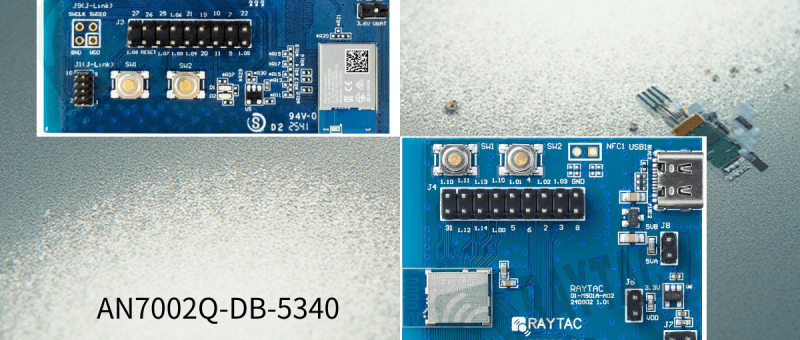
Raytac has advanced the dev kit version of bundle offer – WIFI+BLE: AN7002Q-DB- 5340-M with an on-board flash memory(MX25R64) to create easy evaluation for Wi-Fi project developments.
[January 2026 Update] In this article, we will talk about: Project WITH External Flash MX25R64(8MB) applied – Connecting through SPI between nRF5340 module: MDBT53-1M(BLE) & nRF7002 module: AN7002Q(WIFI) – Connecting through QSPI (XIP) between MDBT53-1M and external memory MX25R64
Table of Content———————————————————————————————————
Hardware Set Up A. Project WITHOUT External Flash MX25R64 needed B. Project WITH External Flash MX25R64 needed
Software Resources & Preparations
Firmware Build & Compile A. Project WITHOUT External Flash MX25R64 needed B. Project WITH External Flash MX25R64 needed
Note: Pease make sure to have both “Nordic nRF5340-DK” and “AN7002Q-DB-5340-M”connected and running during the WIFI+BLE (nRF7002+nRF5340) project development.
Hardware Network: IDC Ribbon Wire(J-Link Cable): Connect nRF5340-DK to AN7002Q-DB-5340-M USB Wire –Type C USB: Power supply to AN7002Q-DB-5340-M through USB TYPE-C USB Wire-Micro USB: Power supply to nRF5340-DK through Micro USB
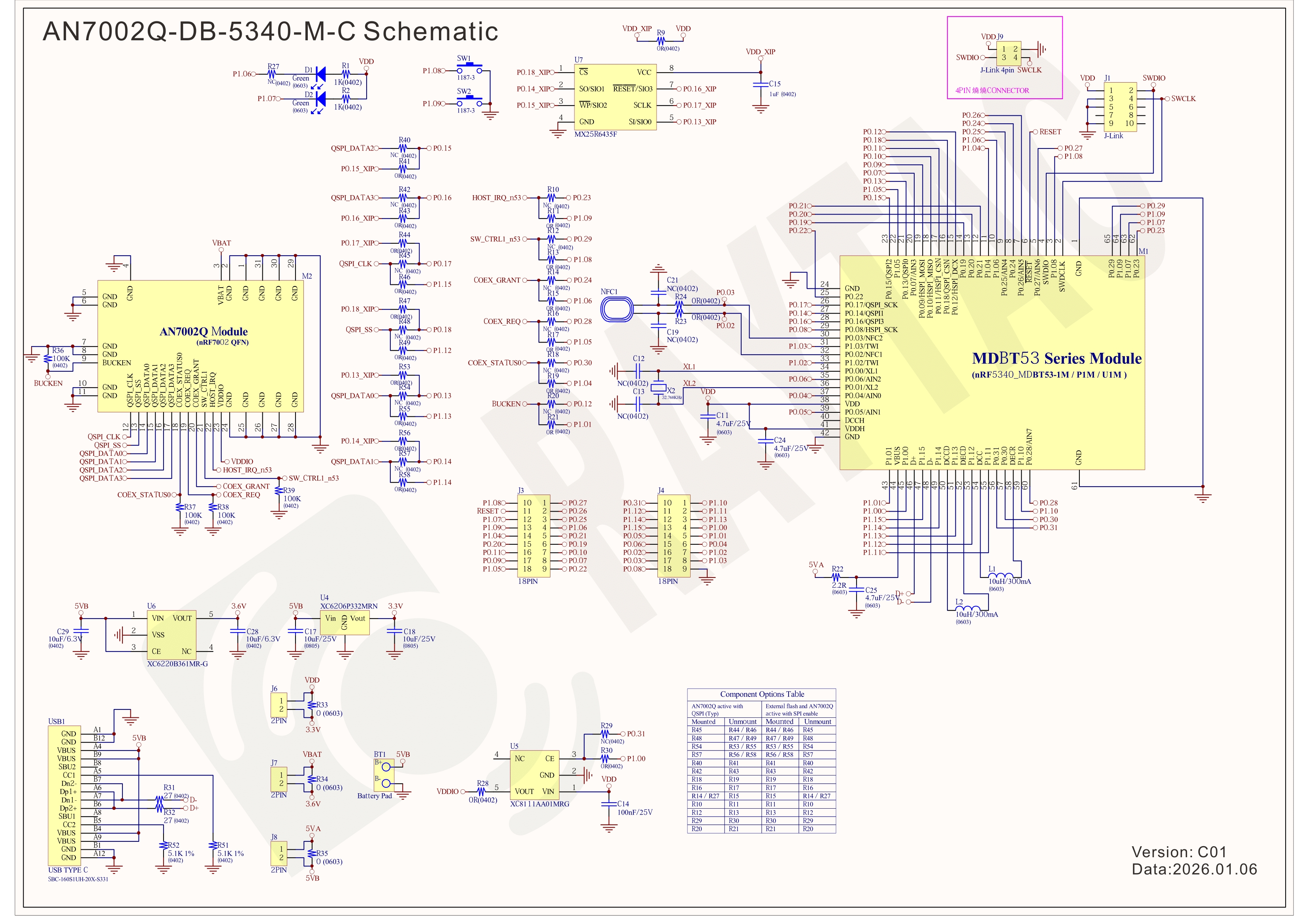
Schematic diagram of AN7002Q-DB-5340-M can be referenced for design as follows. *nRF7002 module <- SPI -> nRF5340 module *MX256R NOR Flahs <-QSPI-> nRF7002 module (Click on the image to zoom in.)
!! Important Note:!! The circuit of SW1(p1.08)/SW2(p1.09)/LED1(p1.06) on AN7002Q-DB-5340-M is NOT COMPATIBLE to Nordic WI-FI Control Pin of swctrl1(p1.08)/host_irq(p1.09)/grant(p1.06). In this case, if you’re working with external flash MX25R64 for the WIFI project, Please avoid pin SW1/SW2/LED1 usage while LED2(p1.07) remains available as normal usage. For the PCB design of end product/end device(mounted with AN7002Q & MDBT53 modules), the switch & LED should be configured to be: SW1(p0.23)/SW2(p0.24)/LED1(p0.28).
Step 1: Prepared with the latest version of nRF Connect for Desktop, using Windows 64-bit – 5.2.0 Step 2: Prepared with the latest version of Command Line Tools, using Windows X86 64 – 10.24.2
**Note: SEGGER J-LINK Upgrade message might pop up while you’re doing above downloads.
Step 3: Locate all the necessary kits for programming in PC
3. Firmware Build & Compile After you download and set up nRFConnect SDK (NCS), you will be able to apply free VS (Visual Studio) Code IDE as firmware programming tool.
The below example uses NCS v3.1.1 and runs the program under: C:\ncs
Step 1: Start with a Wi-Fi Scan project and run the program under: C:\ncs\v3.1.1\raytac <<Create a new application and Copy a sample>>
Step 2: Select SDK v3.1.1 to copy the sample
Step 3: Select example by entering keyword: wifi scan(Wi-Fi Scan)
Step 4: Enter application location: C:\ncs\v3.1.1\raytac and name the project as: wifi_scan_uart_dfu
Step 5: Open an existing application and find the registered project: wifi_scan_uart_dfu
Step 6: How to activate the Devicetree setting of Wi-Fi nRF7002 and Create file:nrf5340dk_nrf5340_cpuapp.overlay Code example is as follows: / { chosen { aliases { /delete-node/ leds; /delete-node/ buttons; }; };
Step 7: It is required to do MCUBoot before working with DFU using External Flash Please do the code configuration in sysbuild.conf as following reference code.
SB_CONFIG_BOOTLOADER_MCUBOOT=y # DFU with UART SB_CONFIG_MCUBOOT_MODE_SINGLE_APP=n
# DFU with external flash SB_CONFIG_PM_EXTERNAL_FLASH_MCUBOOT_SECONDARY=y
Step 8: It is required to doMCUMGR before working with DFU over UART Please do the code configuration in prj.conf as following reference code.
# Enable QSPI driver for Application CONFIG_NORDIC_QSPI_NOR=y
# Enable mcumgr DFU in application CONFIG_MCUMGR=y CONFIG_NET_BUF=y CONFIG_ZCBOR=y CONFIG_CRC=y
# Enable mcumgr management for both OS and Images CONFIG_MCUMGR_GRP_OS=y CONFIG_MCUMGR_GRP_IMG=y CONFIG_FLASH=y CONFIG_IMG_MANAGER=y CONFIG_STREAM_FLASH=y CONFIG_FLASH_MAP=y
# Configure MCUMGR transport to UART CONFIG_MCUMGR_TRANSPORT_UART=y CONFIG_BASE64=y
Step 9: Add with MCUBoot setting , and create a root for sysbuild ; Build with file mucboot.overlay & file mcuboot.conf
9A. To the File: mucboot.overlay &mx25r64 { status = “okay"; };
Step 10: Create a VERSION file by referencing the following code when testing DFU over UART. VERSION_MAJOR = 99 VERSION_MINOR = 0 PATCHLEVEL = 0 VERSION_TWEAK = 0 EXTRAVERSION =
Step 14: Generate a Merged.hex file after compiling the program
Step15: You can choose Build/Debug/Flash under ACTIONS during development << Build >>
<< Debug >>
<< Flash >>
Step 16: Go to ACTIONS >> Memory report to check the memory partitions.
Now you can see partitions available in the system. mcu_secondary has already been located in MX25R64 flash memory.
4. Test/Validate DFU Process & WIFI SCAN After the firmware programmed to MDBT53 module on board, we use the USB to UART adaptor board for connecting AN7002Q-DB-5340-M through: A. MCUMGR UART to PC and through: B. WiFi Scan UART to PC respectively. Note: We suggest you finish connecting A. and B. before running tests.
Now we can run the tests.
A. DFU over UART – Using AuTerm Program 1. We can locate Image version=V99.0.0 under the current VERSION file
It also indicates Image version: 99.0.0 in MCUmgr-Slot 0.
2. Try to modify the file version from V99 to V100 under VERSION file: VERSION_MAJOR = 100
VERSION_MINOR = 0
PATCHLEVEL = 0
VERSION_TWEAK = 0
EXTRAVERSION =
And go with “Pristine Build”
3. We’re about to run DFU over UART , Please DO NOT do “Flash” or “Erase”.
Proceed with “Force reboot”
4. It’s now Version 100.0.0 in Slot 0 under MCUgr ⭢ DFU over UART successfully done!
Before it was Version 99.0.0 in Slot 1 under MCUgr.
B. WIFI SCAN – PuTTY Console WIFI SCAN credentials can be located under PC Console – PuTTY.
Bluetooth Channel Sounding adds a new dimension to wireless connectivity by combining secure data transfer with the low‑power, low‑cost Bluetooth technology already trusted worldwide — now extended to deliver precise location awareness. This evolution means IoT devices can gain both communication and ranging capabilities in a single, efficient platform. With tens of centimeter distance accuracy, Channel Sounding enables practical new use cases such as secure access, proximity‑based services, indoor navigation, and ‘Find My’ functionality.
Android 16 now supports Channel Sounding APIs, making it possible for developers to access this capability directly on flagship devices like the Pixel 10. With anticipated pervasive adoption across the mobile ecosystem, Channel Sounding is positioned to scale broadly and become a standard feature for IoT applications.
The onceLabs demo was reported as the first of its kind in August, gaining notability on LinkedIn(Post link) — and is now being shown for the first time in a public venue. onceLabs’ free BLE Hero app(Download Link) is a sniffer, analyzer, and development tool, available in app stores, and can be seen in action during the live demo. The Android version has been updated to capture and display Channel Sounding data, giving developers clear insight into ranging accuracy and system performance. Since 2018, Raytac and onceLabs have collaborated to bring new Bluetooth capabilities from specification to market‑ready solutions. Raytac’s proven hardware platforms and onceLabs’ application‑layer software expertise combine to accelerate adoption of emerging standards, showing how partnership can translate advanced technology into product‑ready functionality.
QR code on the left: watch the Channel Sounding Live Demo; QR code on the right: download the BLE Hero app on Google Play.
“Our collaboration with onceLabs has always been about enabling customers to move quickly and confidently with the latest Bluetooth technology,” said Lyon Liu, CEO of Raytac Corporation. “This live demo of Channel Sounding is another example of how our partnership delivers not just modules, but complete solutions that inspire new applications.”
Together, Raytac and onceLabs are demonstrating how Bluetooth Channel Sounding can move from specification to practical demonstrations that product companies can act on.
“With Raytac providing the hardware foundation and onceLabs delivering the application software, we continue to support customers in translating new Bluetooth features into real use cases,” said Joseph Bakalor, President and CTO of onceLabs. “Channel Sounding is a perfect example — and with our expertise in Zephyr RTOS, developers can build on open, production‑ready software that scales from prototype to deployment.”
The Raytac + onceLabs demo will be featured in Raytac Booth 5067 at embedded world North America, November 4–6, 2025, at the Anaheim Convention Center. Attendees are invited to visit the booth to see the demo in action and learn how Raytac and onceLabs can support their next wireless product.
About Raytac Raytac Corporation is a leading provider of wireless modules, offering one of the industry’s broadest portfolios of pre‑certified solutions built on Nordic Semiconductor SoCs. With a focus on quality, reliability, and ease of integration, Raytac helps product companies accelerate development and reduce risk when bringing wireless products to market. From consumer devices to industrial applications, Raytac modules are trusted worldwide for their performance, compliance, and long‑term availability. Company website: www.raytac.com
About onceLabs onceLabs delivers custom embedded firmware and mobile application software with a passion for translating client use cases into cloud‑enabled applications that leverage the latest wireless innovations. Known for delivering quality user experiences while optimizing performance and power consumption, onceLabs helps bring products to life through custom software. With design expertise spanning Bluetooth LE, Wi‑Fi, cellular, and other wireless protocols — and a strong engineering foundation in both embedded and mobile software — onceLabs accelerates time‑to‑market through a systems approach to architecture, continuous integration, and real‑world reliability. Company website: www.oncelabs.com
Edited by Business Development Manager: Tony Yin
Raytac Corporation 勁達國際電子股份有限公司 / Raytac Corporation (USA) / abietec Inc. A Bluetooth, Wi-Fi, and LoRa Module Maker/ODM & OEM Manufacturer based on Nordic nRF54; nRF53: nRF52; nRF51; nRF7002 Semtech Specification: SX1262
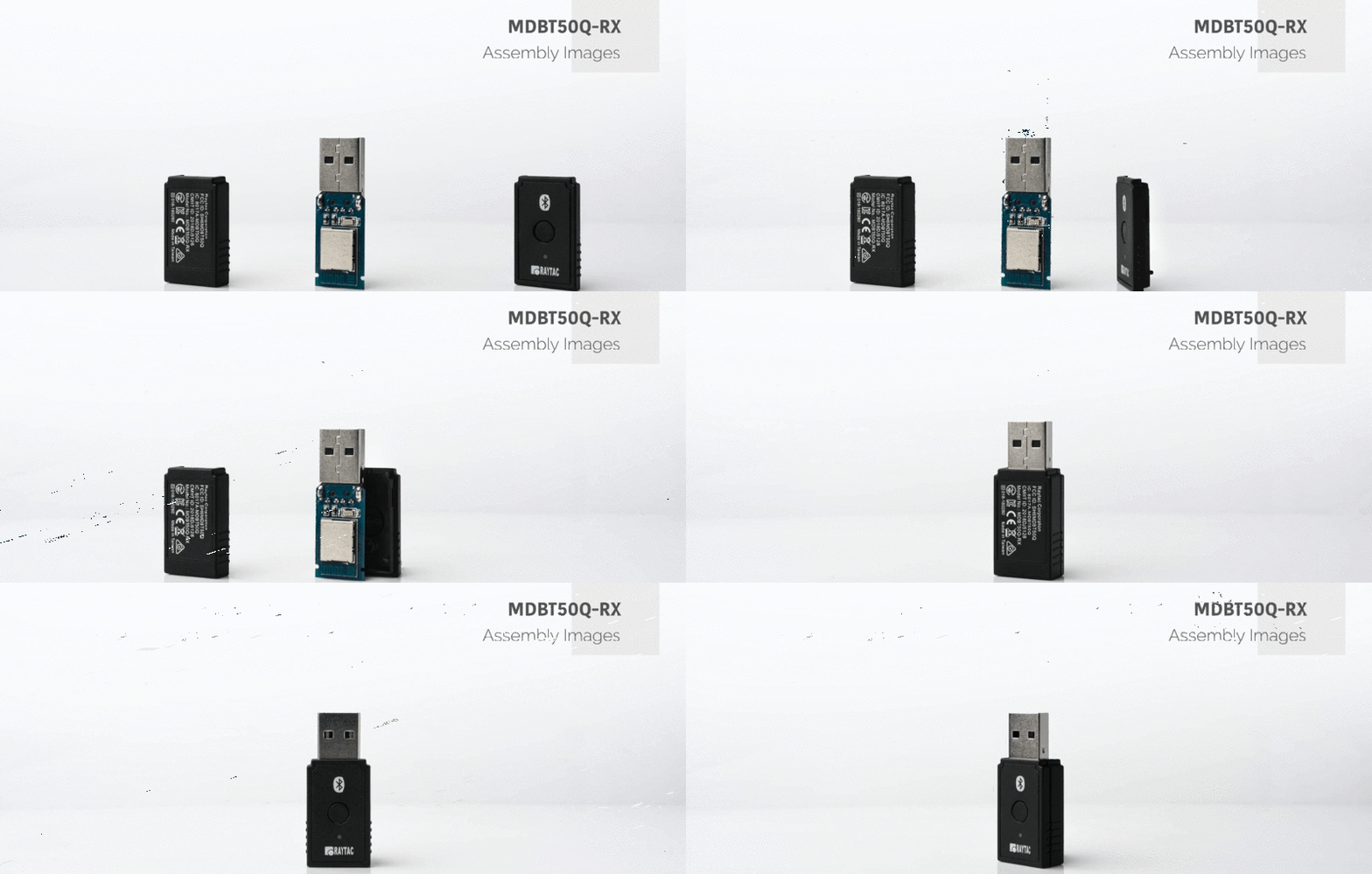
Raytac Corporation would like to inform all customers and partners of an official Product Change Notice: PCN-25100801 regarding the following product series:
Affected Series MDBT50Q-RX Series (nRF52840/833 based USB-A dongles)
Update of Raytac’s company logo on the nameplate, and
Addition of NCC logo on the back label.
There are no changes to product function, performance, quality, form factor, or safety compliances. All existing certifications and technical documentations remain valid.
We kindly invite our customers, distributors, and partners to update your records accordingly. For any questions or support regarding this update, feel free to reach out via: service@raytac.com.
Full details of the PCN please see below(Click on the images to zoom in). Remark: Please take note of the final shipment date.
Edited by Business Development Manager: Tony Yin
Raytac Corporation 勁達國際電子股份有限公司 / Raytac Corporation (USA) / abietec Inc. A Bluetooth, Wi-Fi, and LoRa Module Maker/ODM & OEM Manufacturer based on Nordic nRF54; nRF53: nRF52; nRF51; nRF7002 Semtech Specification: SX1262
[New Taipei, Taiwan / Los Angeles, USA] We’re thrilled to announce that Raytac Group, including Raytac Corporation(USA) and abietec Inc., will be joining Embedded World North America 2025, in November 4-6 at the Anaheim Convention Center, CA. Come find us at Booth #5067!
This year, we’re bringing lots of exciting news: From Raytac:
Brand-new Nordic nRF54L series modules: AN54LQ and AN54LV(Product Link), built for Bluetooth® LE 6.0 with ultra-low power and strong RF performance.
A full Channel Sounding demo on how precise measurement of multipath and distance can enhance real-time location accuracy, improve signal reliability, and optimize antenna placement.
Introducing you to our Ecosystem, including all our partners and technologies used in various applications.
Discover how our modules can reduce development time and costs, making your projects more efficient.
One-on-one consultations with our experts to help you find the right solutions for your needs.
From abietec:
ODM/OEM design services for everything wireless: Bluetooth®, Wi-Fi, mmWave, LoRa, NB-IoT… You name it!
More importantly, Stop by our booth to explore new products, join fun interactive games, and win prizes!
Let Raytac & abietec be your bridge to product success, connecting great ideas with real-world wireless solutions.
We’re waiting for you at: Hall C – Level 1 Booth 5067















 Raytac Corporation